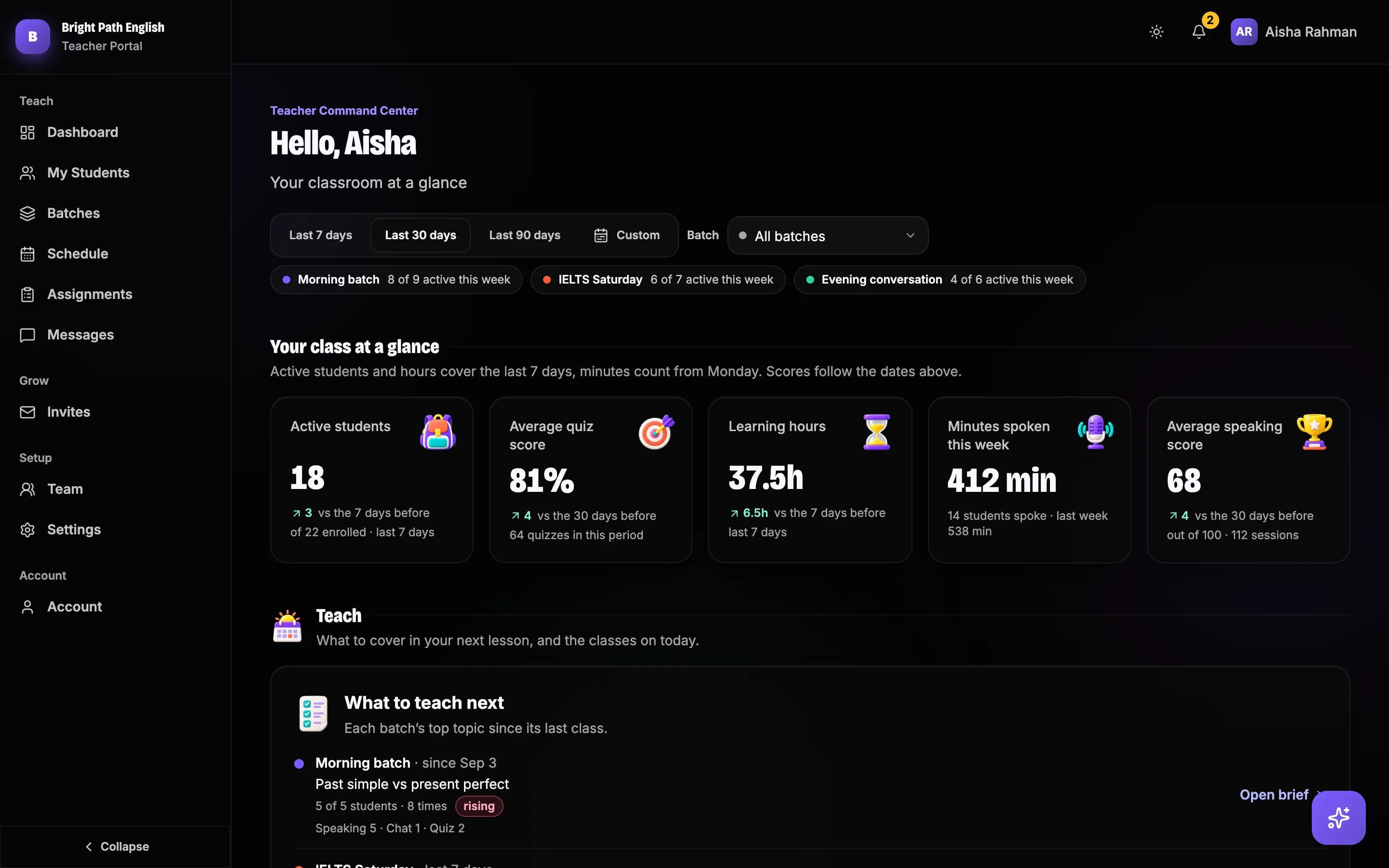



01 / 05Batches · Next class brief
Know what to teach. Before you walk in.
You hear one mistake in twenty. Speakle hears the rest and turns them into a brief for each batch, covering the time since your last class.
For English teachers · academies · schools
Your students practise speaking English with AI between your classes. Every mistake is corrected and explained in their own language. You get one dashboard: who practised, what they got wrong, and what to teach next.
The problem
What changes
Six parts of your work, as they are now and as they are with Speakle.
Inside your dashboard
The five screens you will use most. These are the real screens, filled with a made-up academy so you can see them busy.
01 / 05Batches · Next class brief
You hear one mistake in twenty. Speakle hears the rest and turns them into a brief for each batch, covering the time since your last class.
02 / 05Assignments · Quizzes
Set work for a batch or the whole class with a due date. Students are reminded the day before, and you can stop taking work once it is due.
03 / 05Dashboard
Who practised, how long they spoke, how they scored and who needs you, for the whole academy, one batch, or any dates you pick.
04 / 05Reports · Certificates · Families
Everything a parent asks about, ready to send under your academy’s name.
05 / 05My Students · Invites
Share an invite link for each batch, or import your class list. Every student arrives as a join request, so a shared link never fills your seats by itself.
The portal also has a timetable with reminders, messages your students can answer, a team page for other teachers, quizzes, certificates and more.






How it helps your students
Explanations arrive in their own language, so a mixed class can all use the same tool. Students join on the phone or laptop they already have, with nothing to install. On every plan they speak in scored tests, story retells and Course lessons; the live video coach is on Growth and Academy.
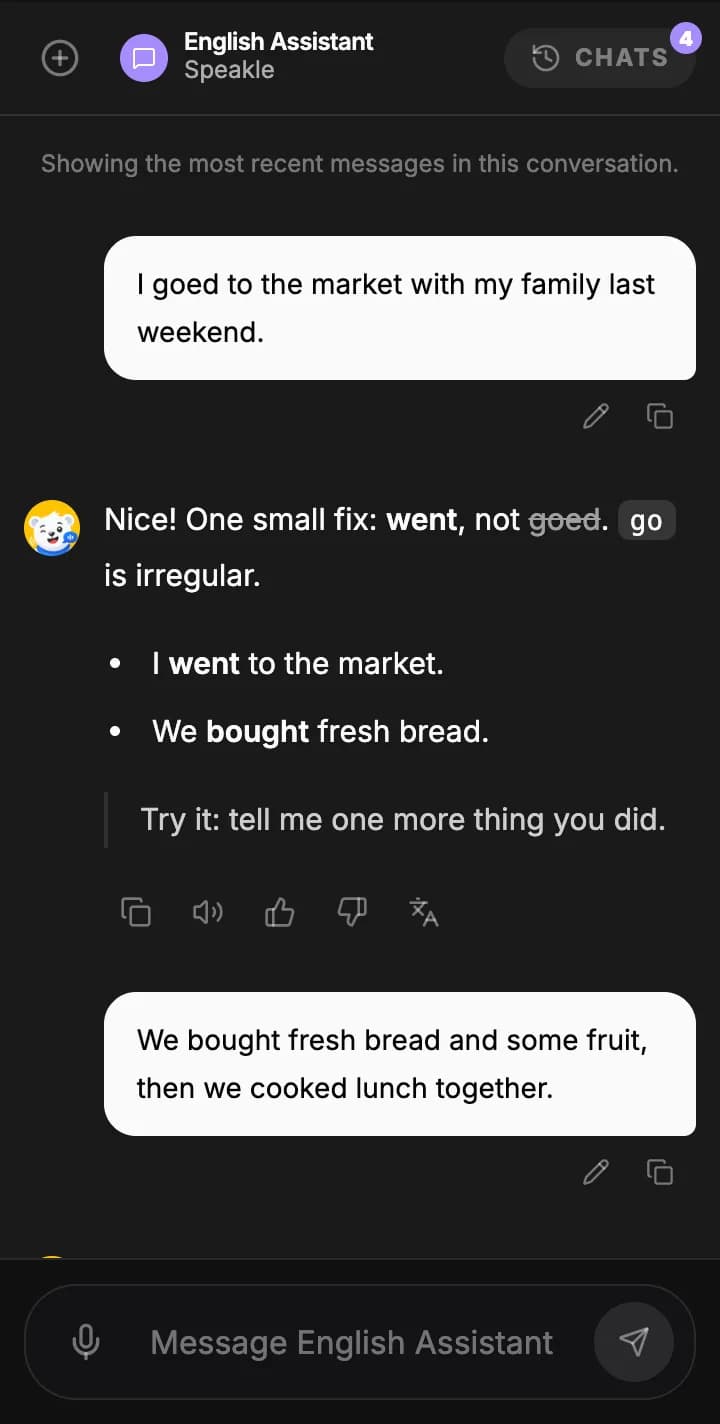
Every mistake is fixed as it happens, with the rule explained in their own language, two examples and a nudge to say one more thing.
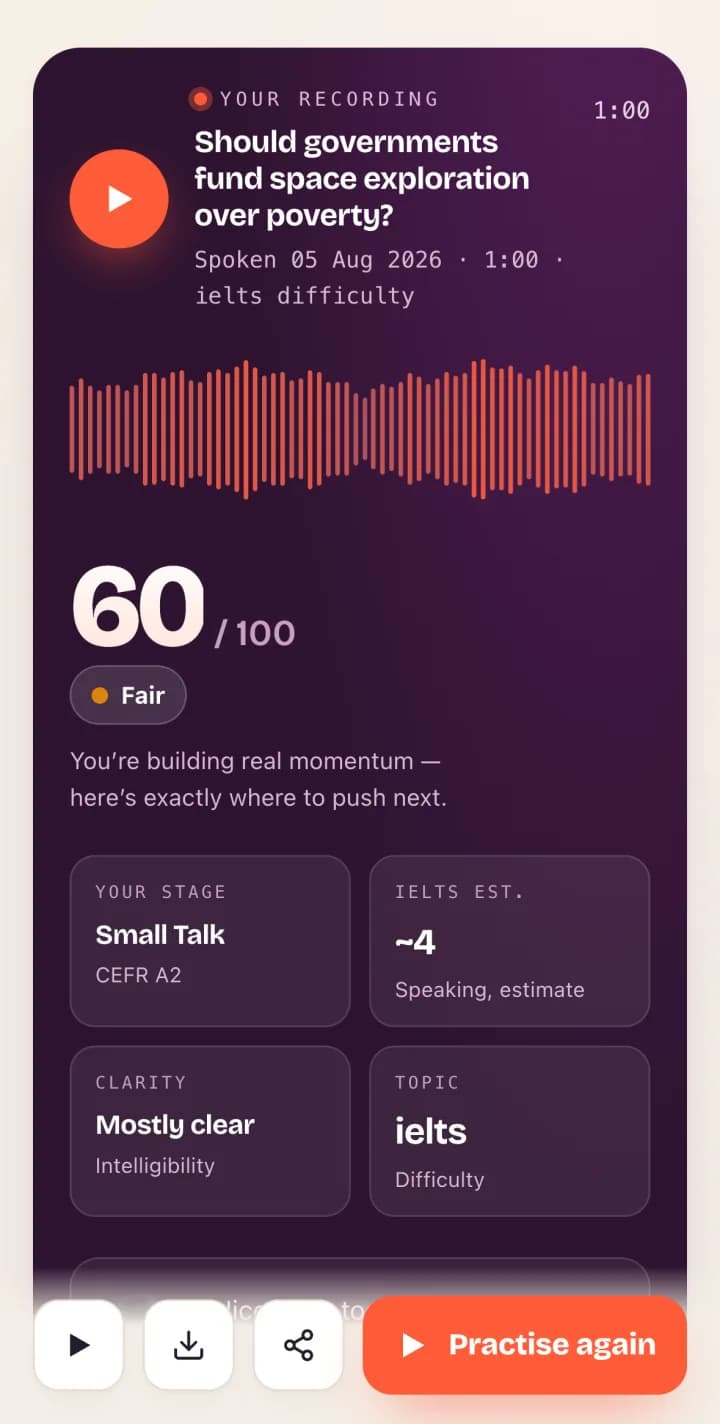
Sixty seconds of speech gives a score out of 100 for fluency, pronunciation, vocabulary, grammar and coherence, with a CEFR level and an IELTS band estimate.
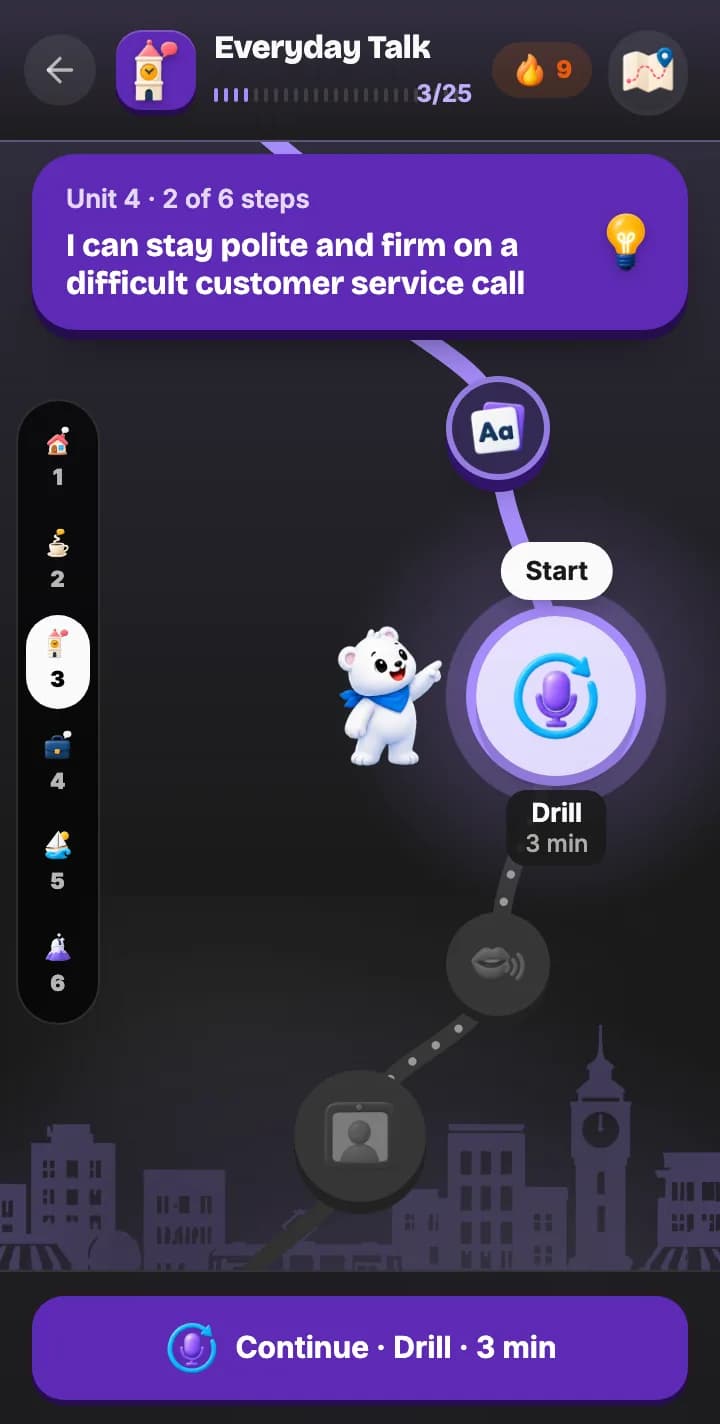
The Course places them between A1 and C2 and lays out the next lesson a few minutes at a time, with daily goals and a streak that bring them back.
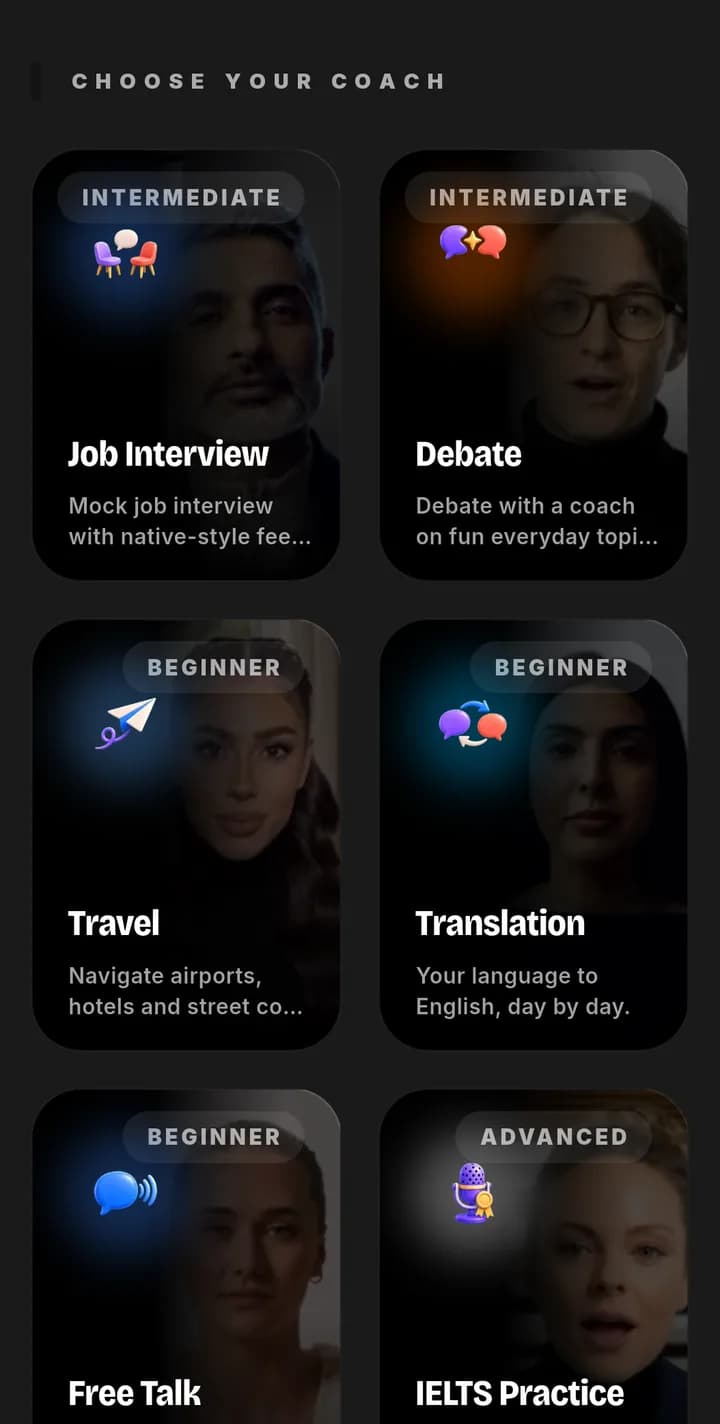
A face-to-face AI coach for a job interview, a debate, a trip, translation, free talk or IELTS practice. No classmates watching, so the quiet students talk too. Minutes come from a pool your class shares.
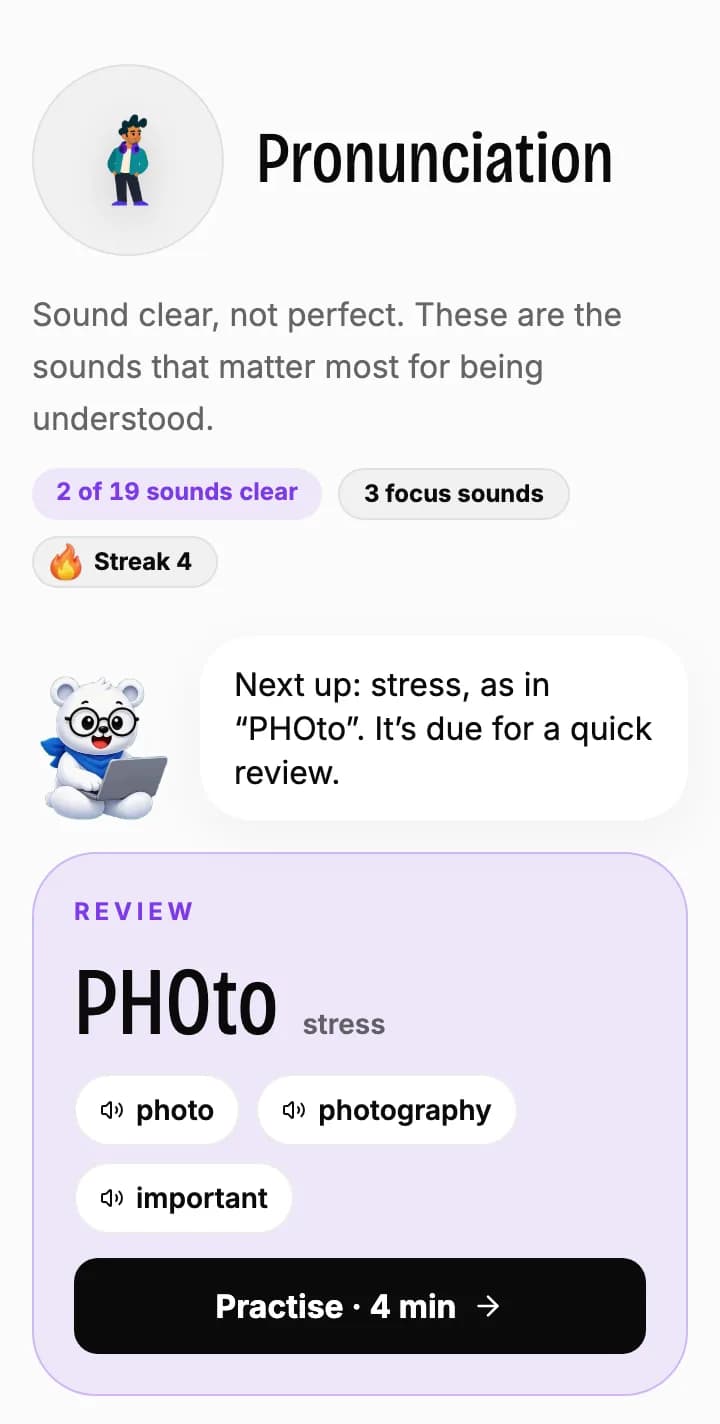
Pronunciation drills chosen for their first language, so each student works on the sounds they actually miss, not a generic list.
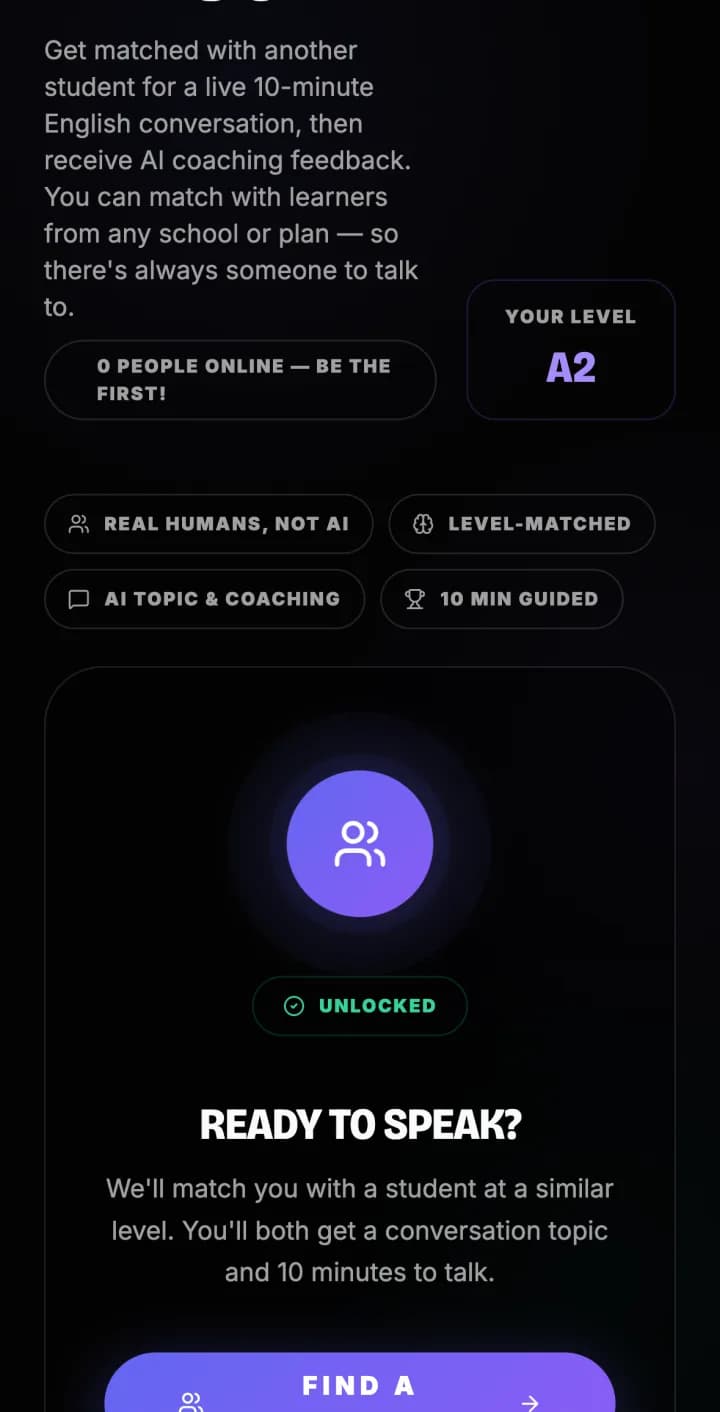
When they are ready, a ten-minute video conversation with another learner at a similar level, followed by AI coaching on how it went.
After every conversation
Each live coach conversation ends with a report written about what the student actually said: what worked, what to fix, and what to try next time. Students keep every one, and can download or share it.
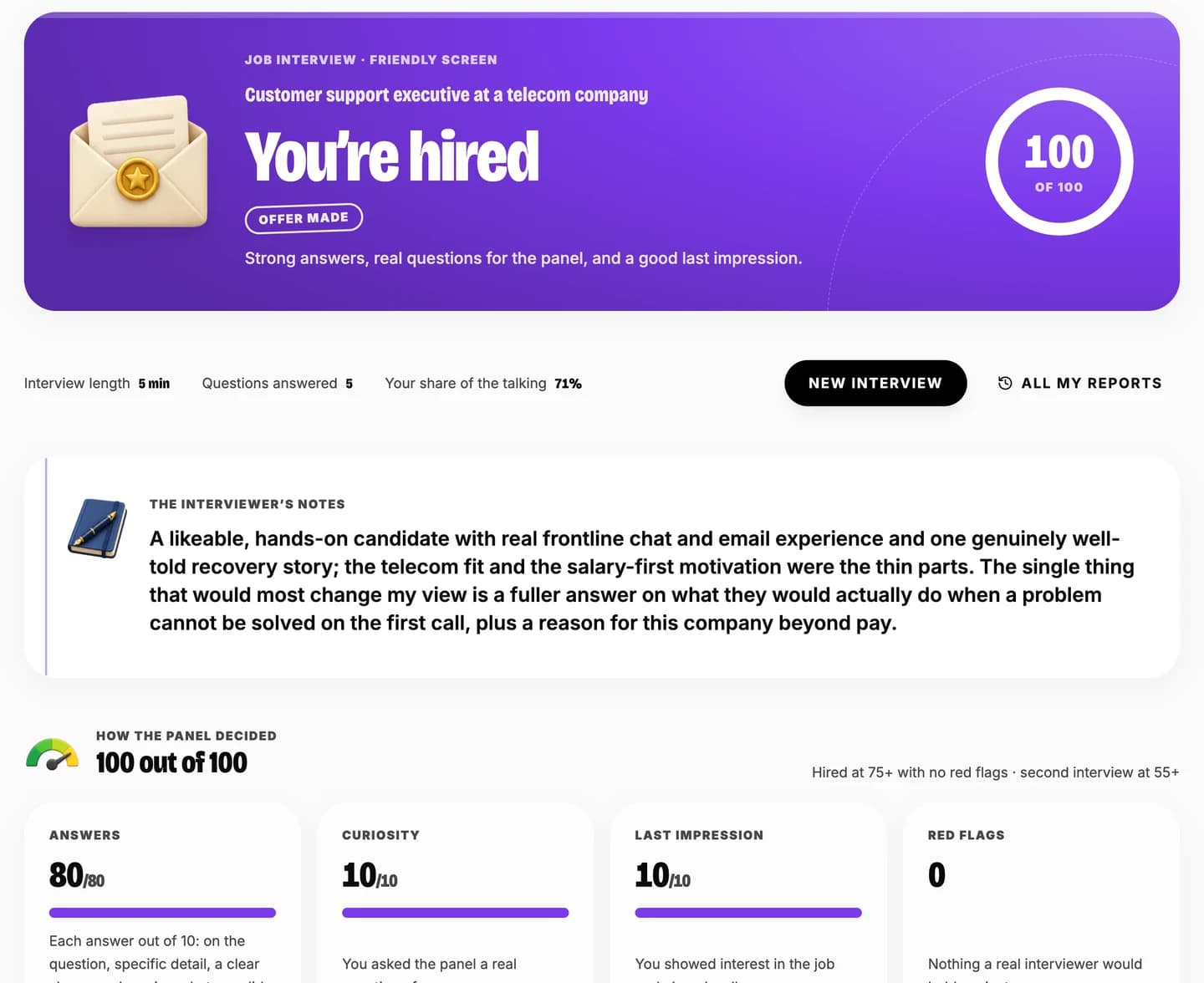
Hired, invited back or not yet, with the interviewer’s notes on what to change.
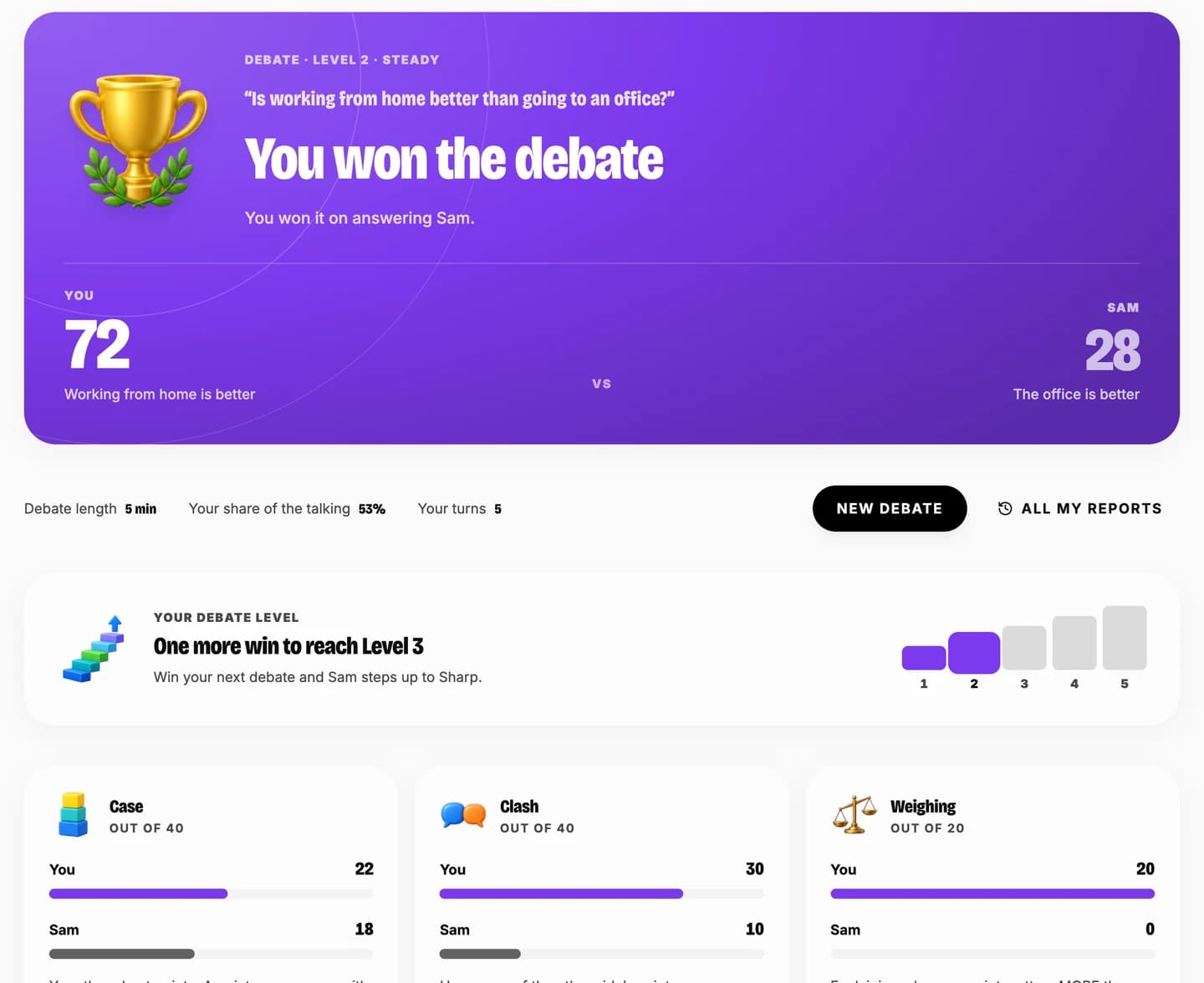
Five levels. Two wins bring a sharper opponent.
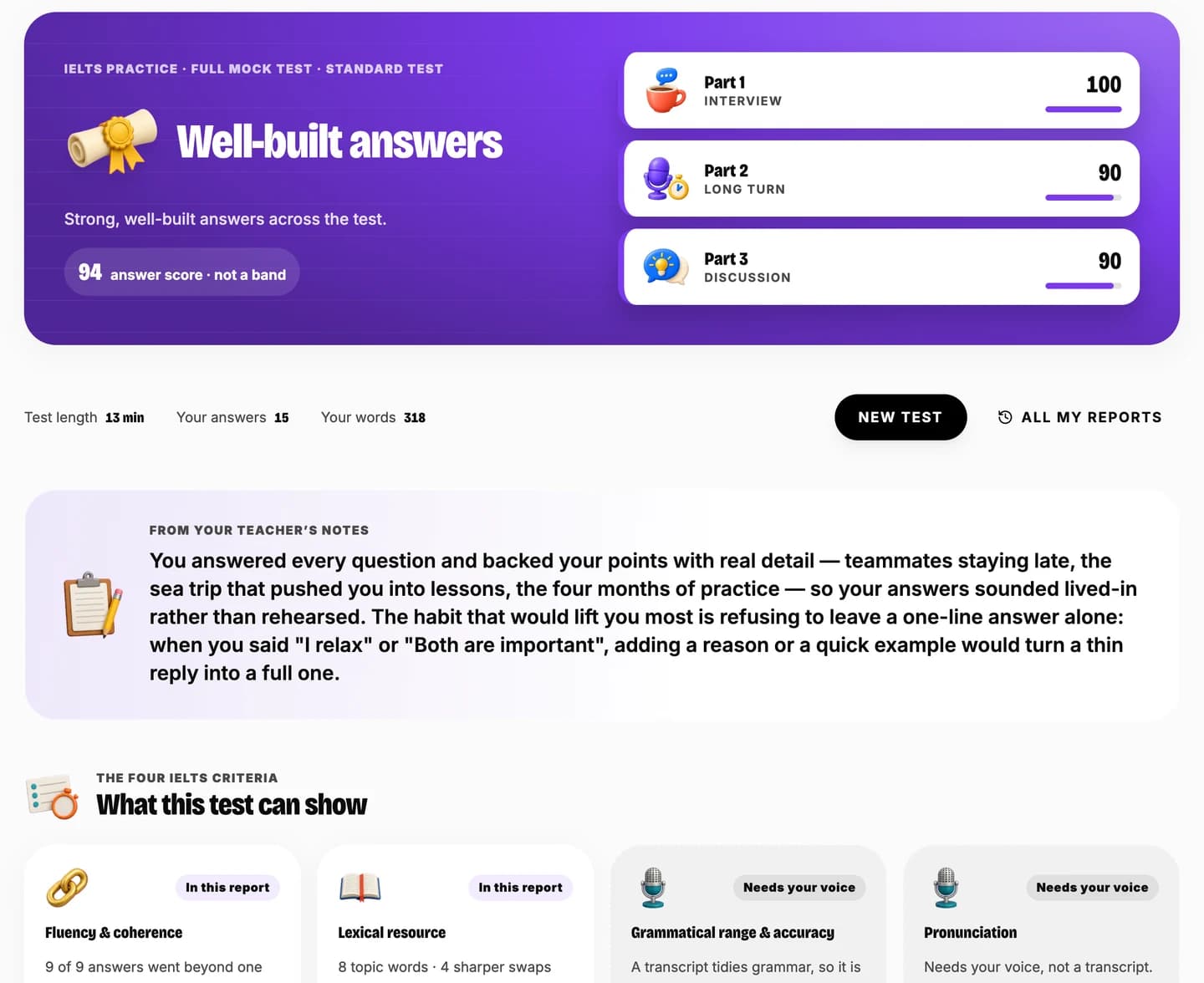
A full mock speaking test, scored part by part.
The reports belong to the student. In your dashboard you see their coach minutes, topics and transcripts.
And one for the family. At the end of term, send home a report with your logo, in their own language: level then and now, attendance, speaking time and your comment.
Open a sample term report (PDF)Pricing
Starter and Growth start with 14 days free. Choose your plan and number of students and add a card: nothing is charged for 14 days, and you can cancel before then.
Most academies sell classes. With Speakle you also sell what happens between them: daily speaking practice, a measured level, and progress a family can check on their phone.
The price per student drops as your class grows. More than 300 students? Talk to us.
A first paid class that wants your name on it.
$126 / monthFor 30 students, billed monthly$4.20 a student. Learner is $6.99 a month on its own.
Not on Starter: the live video coach, a tutor personality you choose, the AI teaching assistant.
Free for 14 days, then $126 / month. Card needed; cancel before day 15 and pay nothing.
Start Starter free for 14 daysThe academy that wants the assistant and the video minutes.
$234 / monthFor 30 students, billed monthly$7.80 a student. Speaker is $12.99 a month on its own.
Free for 14 days, then $234 / month. Card needed; cancel before day 15 and pay nothing.
Start Growth free for 14 daysSeveral batches, more teachers and the most video-tutor time.
$450 / monthFor 30 students, billed monthly$15 a student. Achiever is $24.99 a month on its own.
No free trial on Academy. Billing starts on day one.
Choose AcademyYou pay for the academy. Your students pay nothing, and get what a self-paying learner pays for every month.
Prices are in USD, paid by card. Prices follow your location.
You can change the number of students, or the plan, from your dashboard at any time.
No contract. Cancel from your dashboard; access runs to the end of the period you paid for.
Built for how you teach
Your students practise between lessons, and you start each one knowing where they are.
Batches, invite codes and a brief for every class. Daily speaking becomes part of your course.
Several classes and levels in one place, with reports families and heads of department can read.
Practice for interviews, calls and meetings, with minutes and progress for every team.
Early partner academies
Speakle already serves learners in 11 native languages and is priced for more than 25 countries. The teacher product is new, so instead of a wall of quotes this page shows you the real screens, and the trial lets you check them with your own class. How the scores are made
Questions
Speakle is an AI English speaking tutor for your students plus a dashboard for you. Between your classes each student talks to a live AI tutor, takes scored speaking tests and drills the sounds and grammar they personally get wrong. You see who practised, how long for, what they scored and which mistakes keep coming back, then set assignments against it.
No. Speakle is the practice partner your students do not have between classes, and the counting you do not have time for. Planning, coaching, motivation and marking with real feedback stay with you. The AI assistant on Growth and Academy plans can draft a lesson plan, a quiz or a message, but it cannot send anything to a student.
No. Your plan covers them. A student signs up with your invite code, you approve the join request, and they get the student plan your plan carries: Learner on Starter, Speaker on Growth, Achiever on Academy. You pay per student, and less for each one as your class grows. If a student already pays for Speakle themselves, they keep their own plan and do not use one of your seats.
A phone or a laptop with a browser and a microphone. Video conversations with the AI tutor use the camera too. There is nothing to install, and students join from wherever they already study.
That is the normal case. The Course places each student somewhere between A1 and C2, pronunciation drills adapt to the sounds their first language skips, and explanations arrive in the student’s own language: Arabic, Hindi, Italian, Japanese, Korean, Malay, Portuguese, Spanish, Thai, Turkish or Vietnamese. You still see everyone in one dashboard.
Quizzes and speaking sessions are scored as students do them, so the practice marks itself. For work you set, speaking, story and Course-unit tasks complete themselves when the student does them, and quizzes you write are marked the moment they are handed in. You can listen to every recording, read the transcript, then add your own score and written feedback or ask for another try. Targeted drills are built from a student’s own recorded mistakes with one click.
Each batch has a next class brief. It takes every mistake your students made since your last class, groups them into grammar points you would recognise, and ranks them by how many students need each one, with what they actually said, who said it and a tip for teaching it. From the brief you can set a drill for exactly those students, set the matching grammar quiz, or have the AI assistant draft the lesson. It also lists who has gone quiet and the wins worth mentioning, and prints on one page.
A few minutes. You sign up with your name and email, open the link we send to confirm it, answer a few questions and choose your plan. Then you share an invite code, approve the students who join, and they can practise the same day. Nothing is installed and no IT work is needed.
Each academy is its own tenant. You see only your own students and no other academy can see them. A teacher you add sees only the batches they teach unless you decide otherwise, and you read a student’s conversations only from the day they joined your academy. The weekly AI class summary is generated without student names. You can remove a student, restrict one, or export your whole roster as a spreadsheet at any time.
Starter and Growth start with 14 days free. You choose your plan and how many students, and add a card; nothing is charged for 14 days. On day 15 your plan starts and bills by itself, monthly or yearly. Cancel from your dashboard before then and you pay nothing: your students keep their accounts but move to the free student plan. Academy has no free trial, and you can change plan or the number of students at any time.
The prices on this page follow your location, so what you see is what you pay. Academies in most countries are billed in US dollars by card, and your bank converts the amount; where we bill in the local currency, the page already shows it. Speakle is used by learners across the Middle East, South and South-East Asia, East Asia, Turkey and Brazil.
Yes. From any student page you can make a private progress link for the family, in one of eleven languages. It shows the speaking level, lessons completed, days practised, class attendance, assignments and your shout-outs, and never recordings, chats or mistakes. Links expire after 90 days and you can turn one off at any time. You can also print a branded PDF report.
Usually a few minutes: the next lesson on their Course, a sixty-second speaking test, a story to listen to and retell, or, on Growth and Academy, a live conversation with the AI video coach. Every mistake they make is corrected in the moment, explained in their own language, and added to what you see in your dashboard.
Something else? Email [email protected]
How it works
You open your own academy in a few minutes. No call to book and nobody to wait for; a person is still one email away.

Your name and email below. We email you a 6-digit code. Type it in, choose a password and answer a few questions about your academy.

Pick Starter, Growth or Academy and slide to the number of students. Starter and Growth start with 14 days free: you add a card and nothing is charged until they end.

Students sign up on speakle.ai with your code and appear as join requests. Approve them and they practise the same day.
Two minutes · No waiting
Set up your academy here. Sign up, confirm your email and choose your plan: free for 14 days on Starter or Growth, card needed, nothing charged until day 15.
Buying for a school or a company and need a quote or a call first? Email [email protected] and a person answers.